Screenshot appears after consentScreenshot appears after consentScreenshot appears after consentScreenshot appears after consent
Screenshot appears after consentScreenshot appears after consent
Screenshot appears after consentScreenshot appears after consentScreenshot appears after consent
Summary
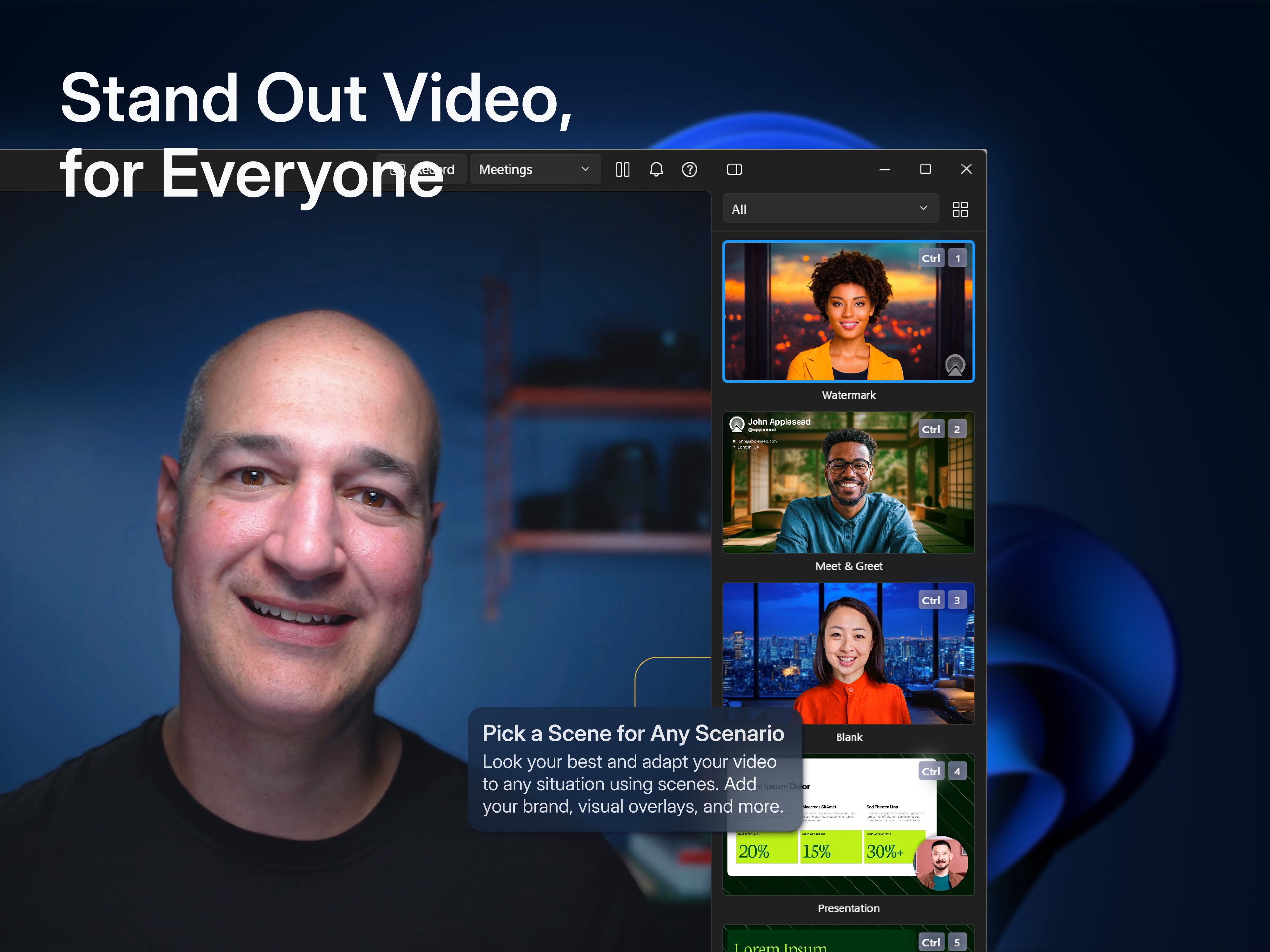
Camo Studio is a webcam app that turns phones, webcams and connected cameras into a video source for meetings, streaming and recording on a computer. It connects via Wi-Fi or USB without extra hardware and works with over 40 apps including Microsoft Teams, Zoom, Google Meet, OBS Studio and Twitch. It offers adjustments for lenses, exposure, colour and contrast along with zooming, cropping and focusing, plus 18 filters supporting custom Cube, 3DL and LUT files for cinematic styling and colour grading. Auto-framing keeps the subject centred on screen, and the app allows switching between multiple device videos in real time and virtual rotation.
Show the developer's original descriptionHide the original description
Camo uses the incredible cameras you already own to produce pro-quality video, whether you’re meeting, streaming, or recording. Its intuitive interface is right at home on your PC, and is compatible with all the apps you already use.
With over 10 million users helped over the last decade, Reincubate is one of the UK’s most-loved software companies.
— EASY TO USE / PLUG AND PLAY / Wi-Fi —
No extra hardware needed, just plug your phone, webcam, or connected camera to your computer. With your phone choose between connecting wirelessly, for the most flexible experience, or opt for a trusty USB connection. With Wi-Fi connectivity, get set up for a call in seconds – no more looking around for a spare cable or a free port.
Camo's core functionality is available for free, but IAP is required to unlock access to higher resolutions, and some features such as portrait model.
— POWERFUL ADJUSTMENTS & FILTERS —
Camo Studio gives you full control of your video, letting you adjust lenses, exposure, colours, contrast, and more; and it lets you zoom, crop, and focus your image precisely how you want it. Apply cinematic styling and colour grading to your video with 18 bespoke filters, including support for custom Cube, 3DL, and LUT files.
— FIND FREEDOM WITH AUTO FRAMING —
Camo’s auto-framing functionality keeps you at the centre of the action, whether you’re shuffling around at your desk or presenting at a whiteboard. With a range of zoom options, you’ll remain firmly centred and proportioned on screen.
— COMPATIBLE WITH OVER 40 APPS —
Camo works perfectly with Microsoft Teams, Zoom, Google Meet, Chrome, OBS Studio, Streamlabs, Skype, Twitch, Panopto, ScreenFlow, and dozens of other video recording and streaming products.
— NOT ONLY BUT ALSO! —
- Camo offloads as much processing to your device as possible, keeping your computer cool and fast
- Virtually rotate your video without touching your device
- Switch between video from multiple devices in real-time
- No ads in the app, not ever
— WE’RE HERE TO HELP —
We’re fanatical about supporting users, and we’d love to help you make the most of Camo. Reach out to us any time: support@reincubate.com
— LEARN MORE —
About us: https://reincubate.com/camo/
How to make the most of Camo: https://reincubate.com/support/how-to/look-best-webcam-video/
FAQ: https://reincubate.com/support/camo/camo-faq/
If there is a version of this app for iOS/Mac or Windows we don't know about, paste the store link here — we'll auto-detect the store.
How to find the URL:1. Open the app in its store. 2.In the App Store app: tap the Share icon → “Copy Link”. In the browser: copy the URL from the address bar — it contains apps.apple.com/…/id… or apps.microsoft.com/detail/…. 3. Paste it here.
Paste the original link from the Apple App Store or Microsoft Store. We fetch all details automatically.
How to find the URL:
1. Open the app in its store. 2.In the App Store app: tap the Share icon → “Copy Link”. In the browser: copy the URL from the address bar — it contains apps.apple.com/…/id… or apps.microsoft.com/detail/…. 3. Paste it here.
Android apps can only be listed by their developer.





 CamPhoto
Take photos and videos with webcam or iPhone
 Cam.On: Webcam Video Recorder
Record, edit and enhance videos with effects
 Camera for OBS Studio
Use iPhone camera as video and audio input for OBS Studio
 Webcam Pro
Monitor webcams and save recordings to cloud storage
 ProCamera. Professional Camera
Pro camera app with manual controls and photo editing
 STARFACE
Mobile business phone system with chat, voicemail and video