Screenshot appears after consentScreenshot appears after consentScreenshot appears after consentScreenshot appears after consentScreenshot appears after consentScreenshot appears after consentScreenshot appears after consentScreenshot appears after consent
Screenshot appears after consentScreenshot appears after consentScreenshot appears after consentScreenshot appears after consentScreenshot appears after consentScreenshot appears after consentScreenshot appears after consentScreenshot appears after consent
Screenshot appears after consentScreenshot appears after consentScreenshot appears after consentScreenshot appears after consentScreenshot appears after consentScreenshot appears after consent
Summary
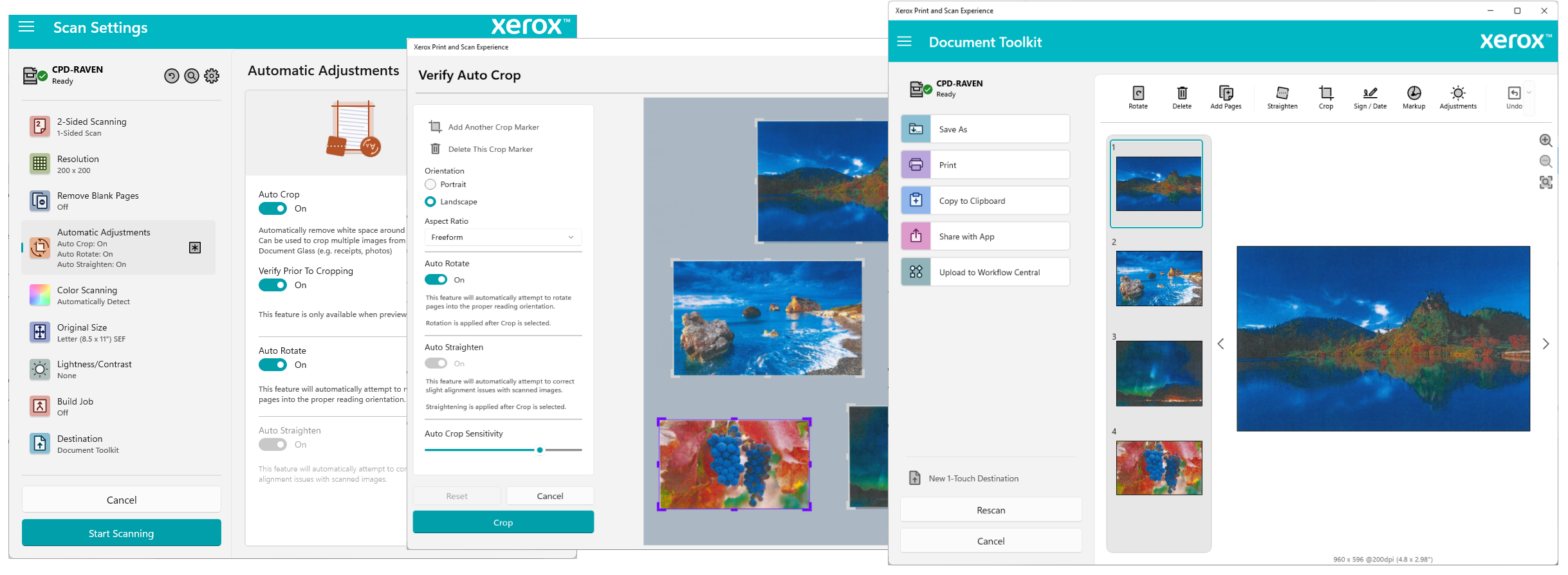
Xerox Print and Scan Experience is an app that delivers enhanced printing and scanning for Xerox and Lexmark devices on Windows. It supports printing from desktop apps via the Print Support App capability for Microsoft IPP Class Driver and Universal Print Class Driver queues, with an interactive preview to check settings before sending a job. Scanned documents can be previewed, edited and saved as PDF, JPEG or PNG, with advanced options like auto-crop, auto-straighten, auto-rotate and blank page removal. The Document Toolkit allows removing, reordering and resizing elements, with results savable, printable, shareable or uploadable to Xerox Workflow Central.
Show the developer's original descriptionHide the original description
The Xerox Print and Scan Experience App provides access to enhanced printing and scanning features of Xerox and Lexmark devices from the convenience of a Windows application and provides support for printing from desktop apps using the Print Support App (PSA) capability for Microsoft IPP Class Driver and Universal Print Class Driver queues connected to Xerox and Lexmark devices. Note: some devices may not support the full set of app functionality. Print from desktop apps using the Print Support App (PSA) capability for Microsoft IPP Class Driver and Universal Print Class Driver queues connected to Xerox and Lexmark devices. When printing from desktop apps you can optionally preview your print settings prior to printing or reroute your print job to our Document Toolkit for further editing and optionally distribute to other destinations. Print PDFs and JPEGs directly from the Xerox Print and Scan Experience app and take advantage of our interactive print preview to ensure your settings are just right before sending the job to the device. Scan, preview, edit, and save your scanned documents in PDF, JPEG or PNG format. Choose your settings prior to scanning, including advanced features such as auto-crop, auto-straighten, auto-rotate, and remove blank pages. You can preview, edit, and distribute the scan using the Document Toolkit. The Document Toolkit provides powerful document editing tools. You can remove, reorder, resize, add signatures, markup and add pages to your document, as well as cropping, straightening and adjusting images. When you're happy with your final document you can save to your hard drive, print it, share it with other apps, copy it to the clipboard, or upload it to Xerox Workflow Central. You can personalize the app to better support your specific workflow needs. Create custom 1-Touch applets on your home screen and custom 1-Touch destinations in the Document Toolkit with specific setting that support your most common document workflows. Show, hide, and reorder the applets on your home screen, and the settings print and scan applets to provide efficient access your most used features.
Technical details about Xerox Print and Scan Experience
Play Store URL for "Xerox Print and Scan Experience"
If there is a version of this app for iOS/Mac or Windows we don't know about, paste the store link here — we'll auto-detect the store.
How to find the URL:1. Open the app in its store. 2.In the App Store app: tap the Share icon → “Copy Link”. In the browser: copy the URL from the address bar — it contains apps.apple.com/…/id… or apps.microsoft.com/detail/…. 3. Paste it here.
Paste the original link from the Apple App Store or Microsoft Store. We fetch all details automatically.
How to find the URL:
1. Open the app in its store. 2.In the App Store app: tap the Share icon → “Copy Link”. In the browser: copy the URL from the address bar — it contains apps.apple.com/…/id… or apps.microsoft.com/detail/…. 3. Paste it here.
Android apps can only be listed by their developer.




 Epson Print and Scan
Print and scan with Epson multifunction printers
 Print and Scan - Document Scanner App
Scan documents and photos, save as PDF or image files
 Scan & Printer
Scan documents, export and print them in one application
 Samsung Printer Experience
Control printers, scan documents and order supplies
 KYOCERA Print Center
Manage, scan and print with KYOCERA network printers
 Canon PRINT
Print and scan from smartphone with printer status display