
Screenshot appears after consentScreenshot appears after consentScreenshot appears after consentScreenshot appears after consentScreenshot appears after consentScreenshot appears after consentScreenshot appears after consentScreenshot appears after consentScreenshot appears after consent
Summary
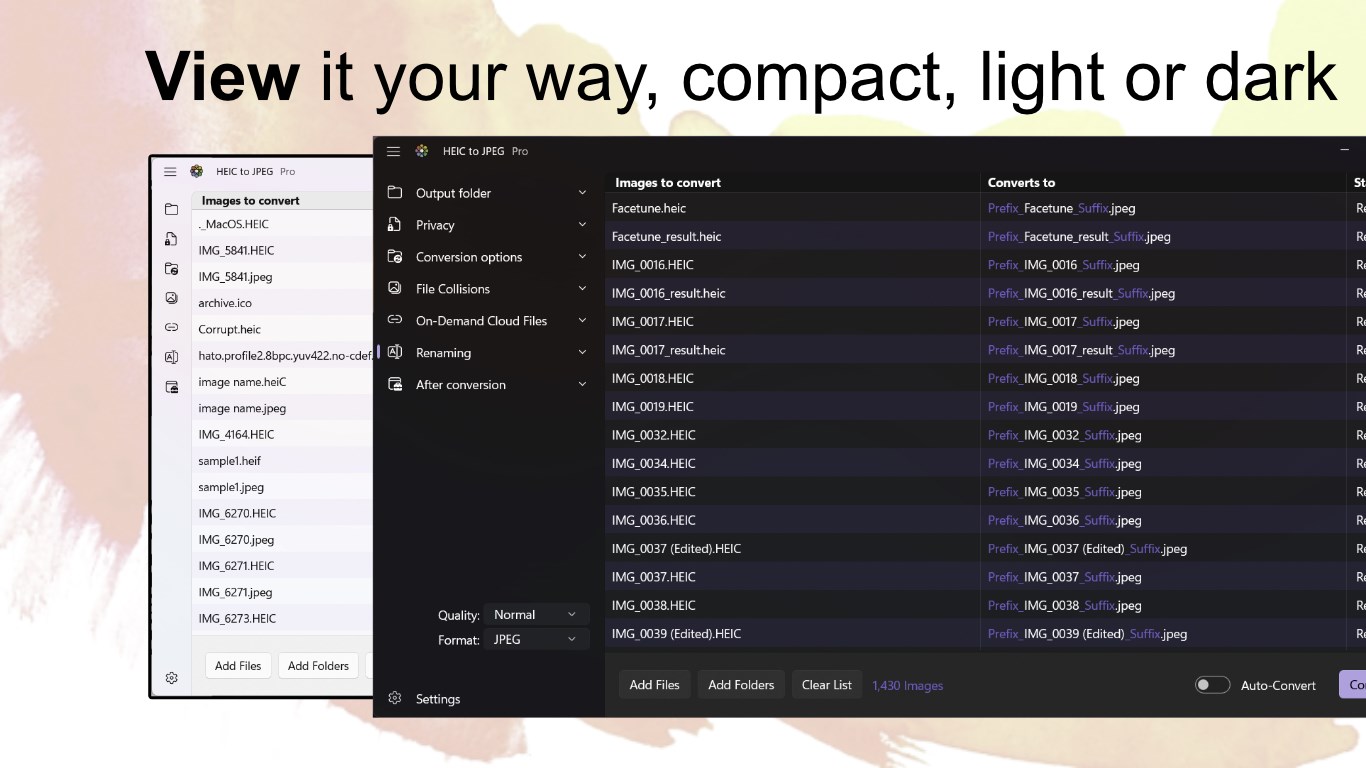
HEIC to JPEG is a file conversion app for Windows 10 and 11 that turns HEIC and HEIF files into JPEG and other formats by simply dropping in files or folders. It supports the iPhone 16 HEIC format and preserves image metadata (EXIF data) during conversion. Besides JPEG, it also handles AI, WebP, PDF, PSD, PNG, HDR, GIF, BMP, TIFF, ICO and JPG files. Conversion happens locally on the device rather than in the cloud, keeping files private and secure, and personally identifiable information can be removed from converted files. Users can choose the output folder, rename files with prefixes or suffixes, and control quality and creation date settings.
Show the developer's original descriptionHide the original description
Converts HEIC & HEIF files without fuss. Just drop your files or folders and they're instantly converted, automatically for Windows 10 and 11.
* Microsoft App Store finalist award for 2022 & 2023.
#1 Converter in the app store with over 1 million downloads and over 1,000 5-Star reviews...
***** Wendy - Works flawlessly Windows 10. Very impressed!
***** Caroline - So simple to use. Converts hundreds of my photos from HEIC to JPEG in minutes.
***** Tony - Great piece of software. Really easy to use.
• Supports the new iPhone 16 HEIC file format
• Privacy is a big feature. We convert locally, send nothing to the cloud, and can remove personally identifiable information (PII) from converted files. You can even delete the original file from existance !
• Converts HEIC to JPEG files, preserving the image metadata (EXIF data).
• also AI, WebP, PDF, PSD, PNG, HDR, GIF, BMP, TIFF, ICO, and JPG
• Converts locally, so it's fast and secure and doesn't upload anything to internet. This also means no internet usage for converting millions of files.
• Convert to a folder, or side-by-side with the originals
• Rename the converted files with prefix, suffix, and naming case changes
• Can ignore cloud based files to prevent downloading.
• You control quality, metadata, creation date, and file collisions naming conventions
• When converting folders, you can keep the original hierarchy for convenience, or not, your choice.
• Professional 16-bit HEIC color depth, and Hight Dynamic Range (HDR) even on ARM devices.
If there is a version of this app for iOS/Mac or Windows we don't know about, paste the store link here — we'll auto-detect the store.
How to find the URL:1. Open the app in its store. 2.In the App Store app: tap the Share icon → “Copy Link”. In the browser: copy the URL from the address bar — it contains apps.apple.com/…/id… or apps.microsoft.com/detail/…. 3. Paste it here.
Paste the original link from the Apple App Store or Microsoft Store. We fetch all details automatically.
How to find the URL:
1. Open the app in its store. 2.In the App Store app: tap the Share icon → “Copy Link”. In the browser: copy the URL from the address bar — it contains apps.apple.com/…/id… or apps.microsoft.com/detail/…. 3. Paste it here.
Android apps can only be listed by their developer.