Screenshot appears after consentScreenshot appears after consentScreenshot appears after consentScreenshot appears after consentScreenshot appears after consentScreenshot appears after consent
Summary
Coloring Book - Harmony is a coloring app for Windows that turns your screen into a canvas for relaxation and creativity. It offers over 1,000 hand-crafted pages covering mandalas, animals, flowers, fantasy scenes and seasonal collections, with new artwork added regularly. Tools include realistic brushes, colored pencils, watercolor effects and soft pastels. Users can choose tap-to-fill or freehand coloring with a stay-inside-lines mode and an unlimited palette. Optimized for pen and stylus but also usable with mouse and trackpad, finished pages can be exported, printed or shared. The app is free, with some brushes and image packs offered as optional purchases.
Show the developer's original descriptionHide the original description
Color like nobody's watching. Share like everybody should be.
Unwind, create, and let your imagination flow with Coloring Book – Harmony, a calming digital coloring experience designed for Windows. Whether you need a zen moment of quiet after a long day or a creative activity to enjoy with your family, Harmony turns your screen into a canvas filled with beautiful artwork waiting for your personal touch.
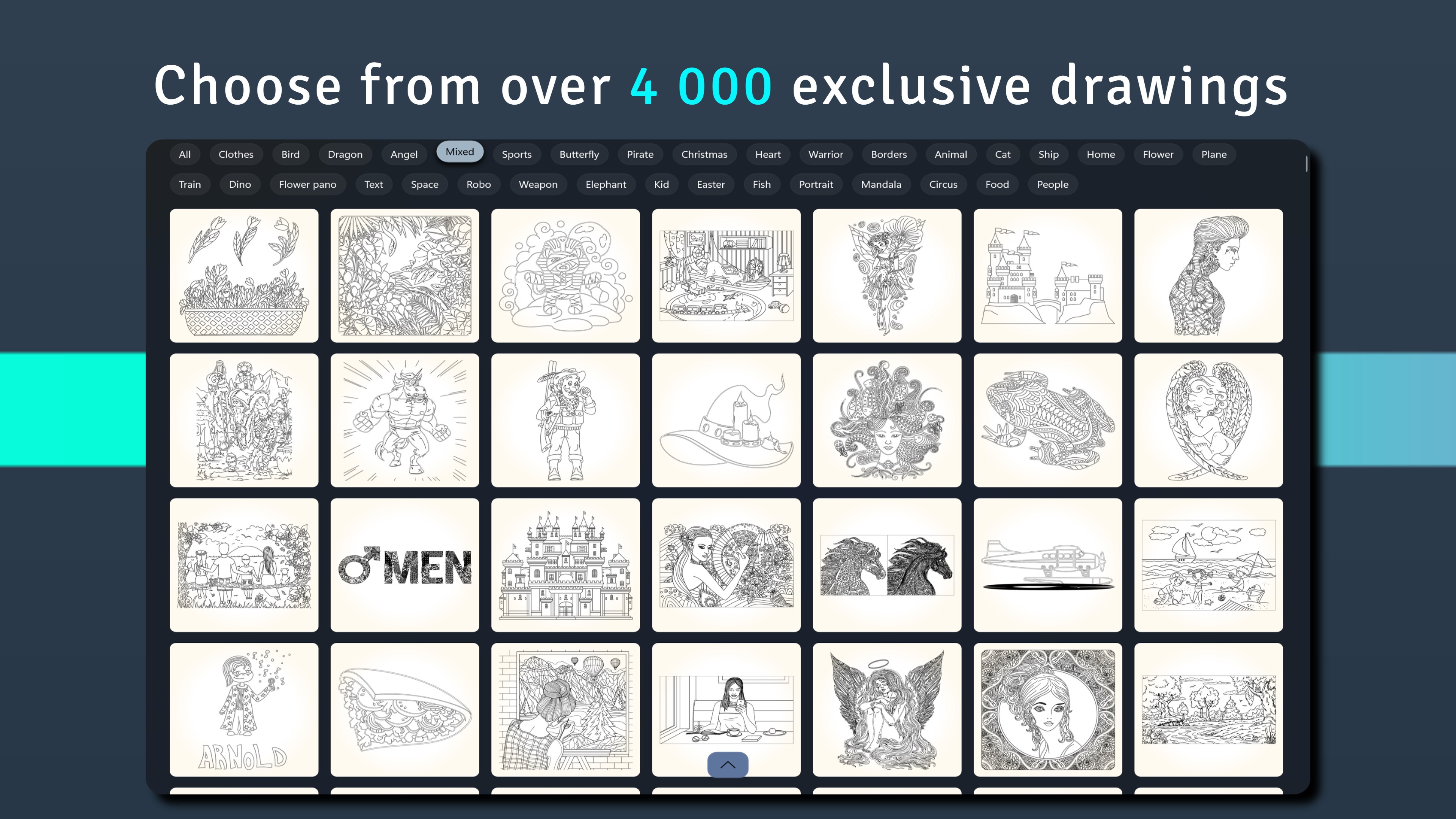
Over 5,000 Coloring Pages to Explore
Discover a rich library of more than 1,000 hand-crafted coloring pages spanning every style and mood. Lose yourself in intricate mandala coloring pages, bring animals and flowers to life with vivid color, or escape into fantasy scenes with unicorns, dragons, and enchanted landscapes. New nature scenes, portraits, and seasonal collections are added regularly — there is always something fresh to inspire you.
Realistic Brushes That Feel Like the Real Thing
Harmony goes far beyond simple fill tools. Choose from a collection of realistic brushes, colored pencils, watercolor effects, glitter brushes, and soft pastels — each one carefully designed to simulate how real art supplies feel on paper. Want something uniquely yours? Create your own custom brushes and save them to your personal toolkit for a drawing and painting experience that is truly one of a kind.
Color Your Way
Start with tap to fill for a relaxing, effortless coloring session, or switch to freehand coloring to shade, blend, and add fine detail with a stylus or mouse. The stay-inside-lines mode keeps everything neat, while an unlimited color palette with gradient fills and custom blends gives you complete creative freedom. It is a coloring game that grows with you — easy enough for beginners, deep enough for artists.
Go Back and Perfect Any Stroke
Made a choice you want to revisit? Harmony's stroke history editing lets you change any individual stroke — even one you made long ago — without starting over. It is like having an unlimited undo that works on any part of your artwork, giving you the confidence to experiment freely.
Designed for Surface Pen and Stylus
Harmony is optimized for Microsoft Surface Pen and stylus drawing with pressure sensitivity and smooth, responsive input. Every brushstroke feels natural and precise, whether you are sketching broad watercolor washes or adding tiny pencil details. Works beautifully with mouse and trackpad too.
Share, Save, and Print Your Masterpieces
Export your finished artwork in high quality, print your coloring pages for framing, or share directly to social media. Every piece you complete is worth showing off.
Capture the Journey — Export as GIF or Video
Watch your artwork come to life all over again. Harmony records your entire coloring session and lets you export it as a GIF or video — a beautiful, stroke-by-stroke replay of your creative process. Share your time-lapse to social media, send it to friends, or keep it as a personal keepsake. It is not just coloring — it is storytelling.
A Calming Hobby for Everyone Who Loves to Create
Harmony is a family-friendly coloring app for adults seeking art therapy, stress relief, and meditation through color, and for kids discovering the joy of creative play. No experience needed — just pick a page, choose a color, and feel the calm wash over you. It is color therapy, mindfulness, and creative relaxation wrapped into one beautiful app — your daily digital coloring retreat for the mind.
A Note on Premium Features
Harmony is free to download and comes packed with content you can enjoy right away. Some features — including select image packs, specialty brushes, and advanced tools — are part of our premium collection and available as optional in-app purchases. Not all features are free, but there is plenty to explore before you ever consider upgrading.
Turn your Windows device into a personal art studio. Start coloring with Harmony today.
If there is a version of this app for iOS/Mac or Windows we don't know about, paste the store link here — we'll auto-detect the store.
How to find the URL:1. Open the app in its store. 2.In the App Store app: tap the Share icon → “Copy Link”. In the browser: copy the URL from the address bar — it contains apps.apple.com/…/id… or apps.microsoft.com/detail/…. 3. Paste it here.
Paste the original link from the Apple App Store or Microsoft Store. We fetch all details automatically.
How to find the URL:
1. Open the app in its store. 2.In the App Store app: tap the Share icon → “Copy Link”. In the browser: copy the URL from the address bar — it contains apps.apple.com/…/id… or apps.microsoft.com/detail/…. 3. Paste it here.
Android apps can only be listed by their developer.





 Colorfy: Coloring Book Games
Coloring book with 1000+ images and mandala creator
 Adult Coloring Book - Pigment
Color illustrations with various pencils and brushes
 Art Book: Paint Color by Number
Paint by numbers with mandalas, animals and art designs
 Adult Coloring Book With Multiple Templates & Colors
Digital coloring book with mandalas, zen art and animals
 Sketchbook: Create Digital Art
Drawing and painting app with professional brushes and tools
 Lake: Coloring Book for Adults
Coloring app with hand-drawn illustrations and art brushes