Screenshot appears after consentScreenshot appears after consentScreenshot appears after consent
Summary
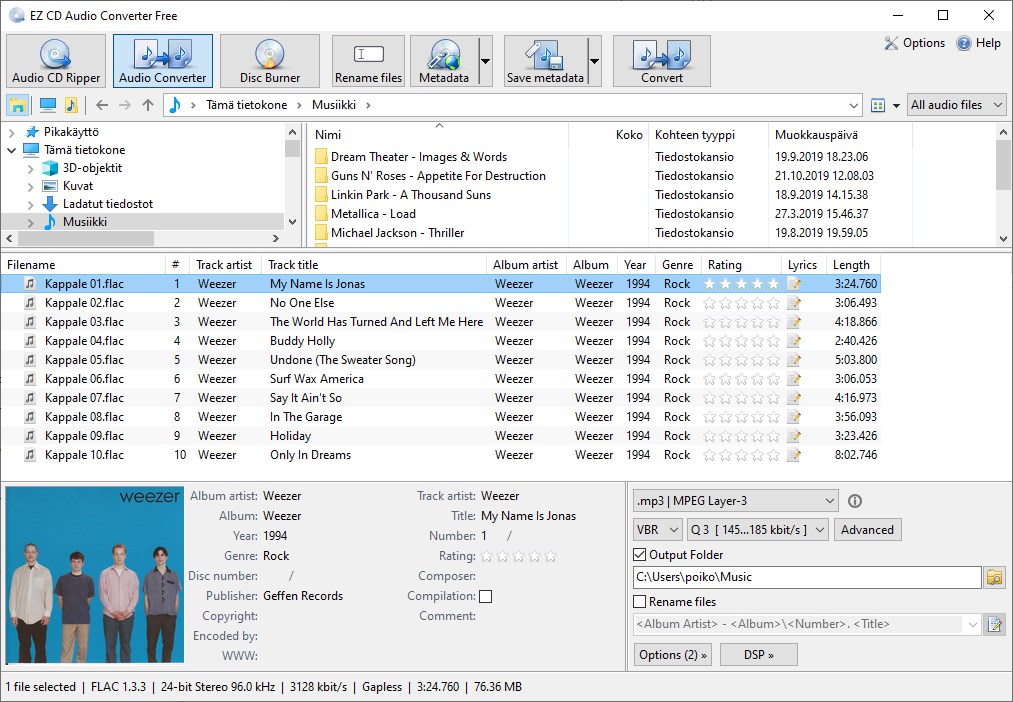
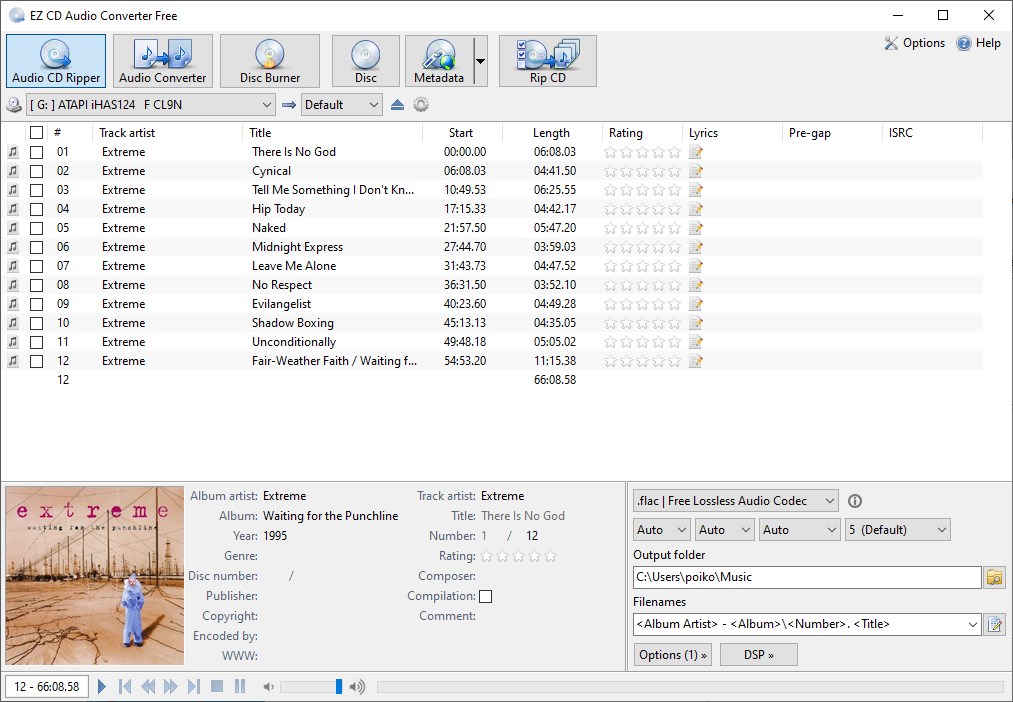
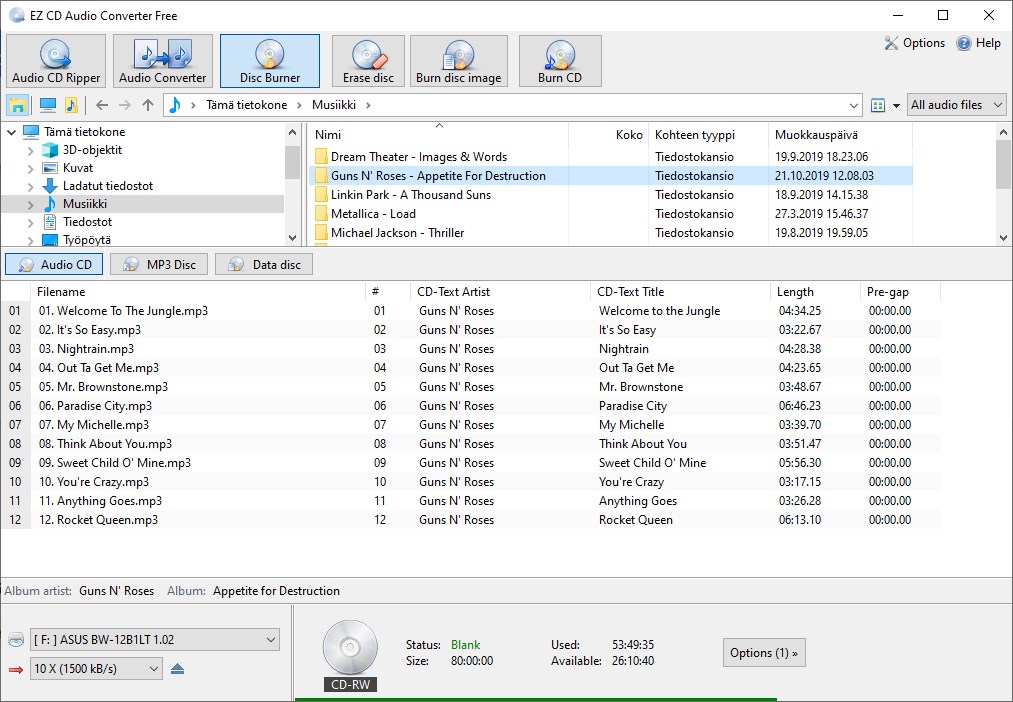
EZ CD Audio Converter Free is an audio conversion tool that rips CDs, burns discs and batch converts files between formats such as MP3, FLAC, M4A, AAC, Opus, WAV, Apple Lossless and Vorbis while preserving metadata, which can also be edited before conversion. It rips audio CDs with automatic metadata and artwork retrieval from MusicBrainz and Amazon, and it creates audio CDs, MP3 discs and data discs. It uses a 24-bit audio engine with high-quality sample rate conversion, support for high-resolution audio, and gapless encoding and decoding, and the provider states the app has no usage limitations and contains no ads.
Show the developer's original descriptionHide the original description
EZ CD Audio Converter Free – Easy-to-Use, All-in-One Music Converter
Effortlessly convert audio files, rip CDs, and burn CD/DVDs with one easy-to-use tool.
Key Features:
· Audio File Converter: Batch convert audio files between virtually any format with high-speed performance and precise results.
· Audio CD Ripper: Digitally rip audio CDs with perfect quality and automatic metadata from MusicBrainz.
· Disc Burner: Create audio CDs, MP3 discs, and data discs with ease.
Supports All Popular Audio Formats:
· Convert to and from MP3, FLAC, M4A, AAC, HE-AAC (v2), Opus, WAV, Apple Lossless, Vorbis, and many more.
Fast & Efficient Conversion:
· Convert unlimited files at once while preserving metadata.
· Edit metadata before conversion, and maintain folder structure or customize output paths using metadata tags.
· Whether you're converting FLAC to MP3, M4A to WAV, or any other format combination, EZ CD Audio Converter Free has you covered.
CD Ripping Made Easy:
· Rip your CDs into digital audio files with support for all popular formats. Automatically retrieve album info and artwork from MusicBrainz and Amazon.
Safe & Ad-Free:
· No usage limitations, no ads—just clean, reliable software.
Audio Engine & Quality Highlights:
· Accurate 24-bit audio engine
· High-quality sample rate conversion
· Full support for high-resolution audio
· Gapless encoding & decoding
· Loudness normalization with EBU R128 & ReplayGain v2
SUPPORTED AUDIO FORMATS:
Sample rates: 8 kHz - 384 kHz
Bit depths: 8-bit, 16-bit, 24-bit, 32-bit float, 32-bit, 64-bit float, 64-bit
Channels: Mono, Stereo, Multichannel (4.0, 5.0, 5.1, 6.1, 7.1)
SUPPORTED AUDIO FILE FORMATS:
CD-DA (audio CD cda) AAC (aac m4a 3g2 3ga 3gp m4b mp4), HE AAC (aac m4a 3g2 3ga 3gp m4b mp4), FLAC (flac), Opus (opus ogg), Wave (wav RIFF RF64), Apple Lossless (m4a), MPEG Layer-3 (mp3), MPEG Layer-2 (mp2), MPEG Layer-1 (mp1), Monkey's Audio (ape), AC-3 (ac3), DTS (dts dtshd), TrueHD (thd truehd), Atmos, Windows Media Audio (wma asf wmv), Vorbis (ogg), WavPack (wv), Musepack (mpc), True Audio (tta), Adaptive Multi-Rate NB+WB (amr), AIFF (aif aiff), AU (au), avi, caf, cue, divx, Direct Stream Digital (dsf), dv, eac3, flv, m2ts, m3u, m3u8, mka, mkv, mov, mpeg, mpg, oma, omg, Real Audio (ra ram rm), Shorten (shn), Speex (spx), TAK (tak), vob, Wave64 (w64), webm
Technical details about EZ CD Audio Converter Free
If there is a version of this app for iOS/Mac or Windows we don't know about, paste the store link here — we'll auto-detect the store.
How to find the URL:1. Open the app in its store. 2.In the App Store app: tap the Share icon → “Copy Link”. In the browser: copy the URL from the address bar — it contains apps.apple.com/…/id… or apps.microsoft.com/detail/…. 3. Paste it here.
Paste the original link from the Apple App Store or Microsoft Store. We fetch all details automatically.
How to find the URL:
1. Open the app in its store. 2.In the App Store app: tap the Share icon → “Copy Link”. In the browser: copy the URL from the address bar — it contains apps.apple.com/…/id… or apps.microsoft.com/detail/…. 3. Paste it here.
Android apps can only be listed by their developer.


 CD Audio Grabber PRO
Convert CDs to MP3 files
 CD Ripper by Nero
Rip audio CDs with automatic covers and metadata
 Audio Converter - Any Audio Converter
Convert audio files locally to any format you need
 Audio Converter Any Format
Convert audio formats, trim clips and adjust bit rate
 My MP3 Converter
Convert audio and video files to MP3
 Video Converter‘
Convert video and audio files between formats