

Doc Scan For Windows: Scan to PDF, Docx, Xlsx
Scan documents and convert them to PDF, Word or Excel AI summary
Screenshots
Summary
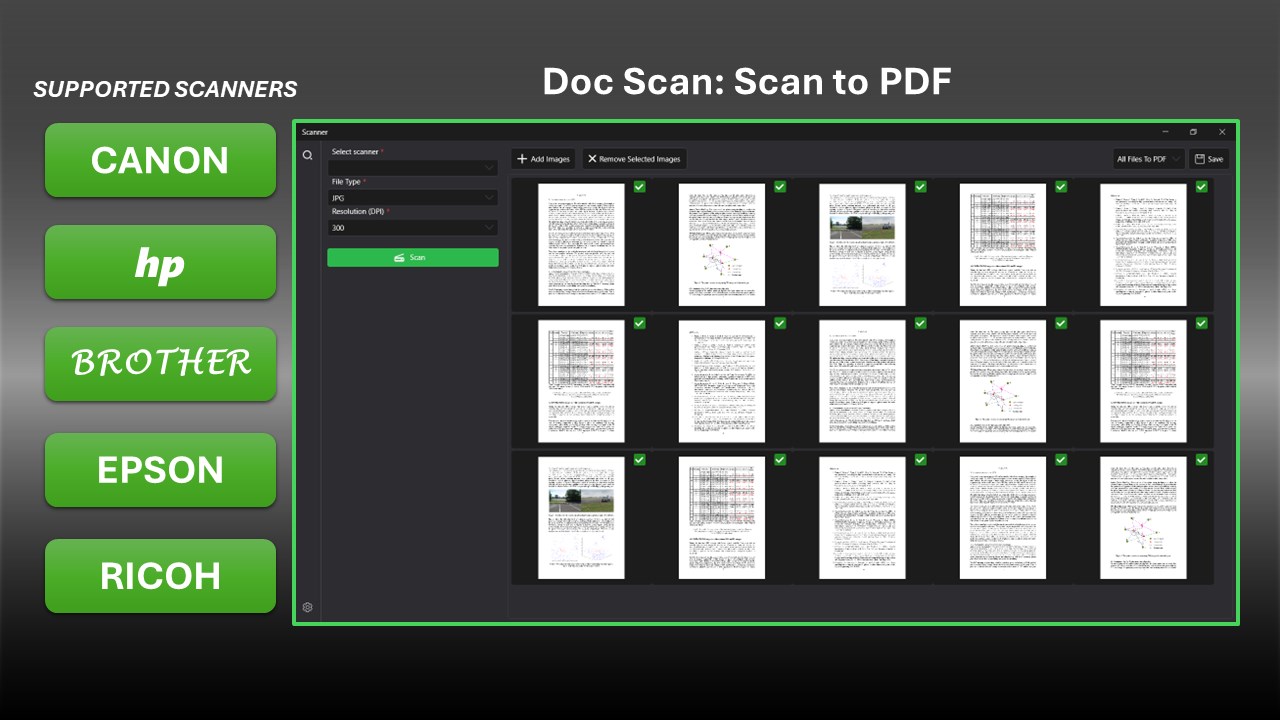
Doc Scan For Windows: Scan to PDF, Docx, Xlsx is a document scanning app for Windows that converts paper documents and images into PDF, Word or Excel files, as well as PNG or JPG. It supports scanners and printers from brands including HP, Canon, Brother, Epson, Fujitsu, Deli, Lenovo, Panasonic, Ricoh, Samsung and Xerox. OCR (optical character recognition) turns scanned documents and images into editable text. The app offers batch processing, automatic cropping and image enhancement, and saving files in the preferred format.
Show the developer's original descriptionHide the original description
Doc Scan for Windows – Scan to PDF, Word & Excel
Turn paper documents into PDF, Word, and Excel spreadsheets directly from your Windows PC. The app enables easy scanning and saving of documents and images in your preferred format with just a single click.
It is compatible with various brands of scanners and printers, such as HP, Canon, Brother, EPSON, Deli, Lenovo, Panasonic, Ricoh, Samsung, and Xerox, among others
Scan. Convert. Edit. Done.
Technical details about Doc Scan For Windows
Doc Scan For Windows in the rankings
Manage app
Are you on the developer team behind Doc Scan For Windows?
Verify yourself and manage your listing on Most Voted Apps.
Verify Doc Scan For Windows for free
Verification usually takes only a few minutes.
Similar apps to Doc Scan For Windows
 PDF Document Scanner
Scan documents and create, edit multi-page PDF files
 Doc Scan PDF Scanner
Scan documents and images, save as PDF or image format
 PDF Conversion Suite
Convert documents to PDF, TIFF or Word format
 Scanner App: PDF Scan
Scan, edit and manage documents as PDF files
 PDF scanner : Scanning and OCR
Scan documents and convert to editable files with OCR
 PDF Scanner App, OCR: Docutain
Scan documents as PDF, organize them and make text