


Scan Document to PDF
Scan documents and save as searchable PDF files AI summary
Screenshots
Summary
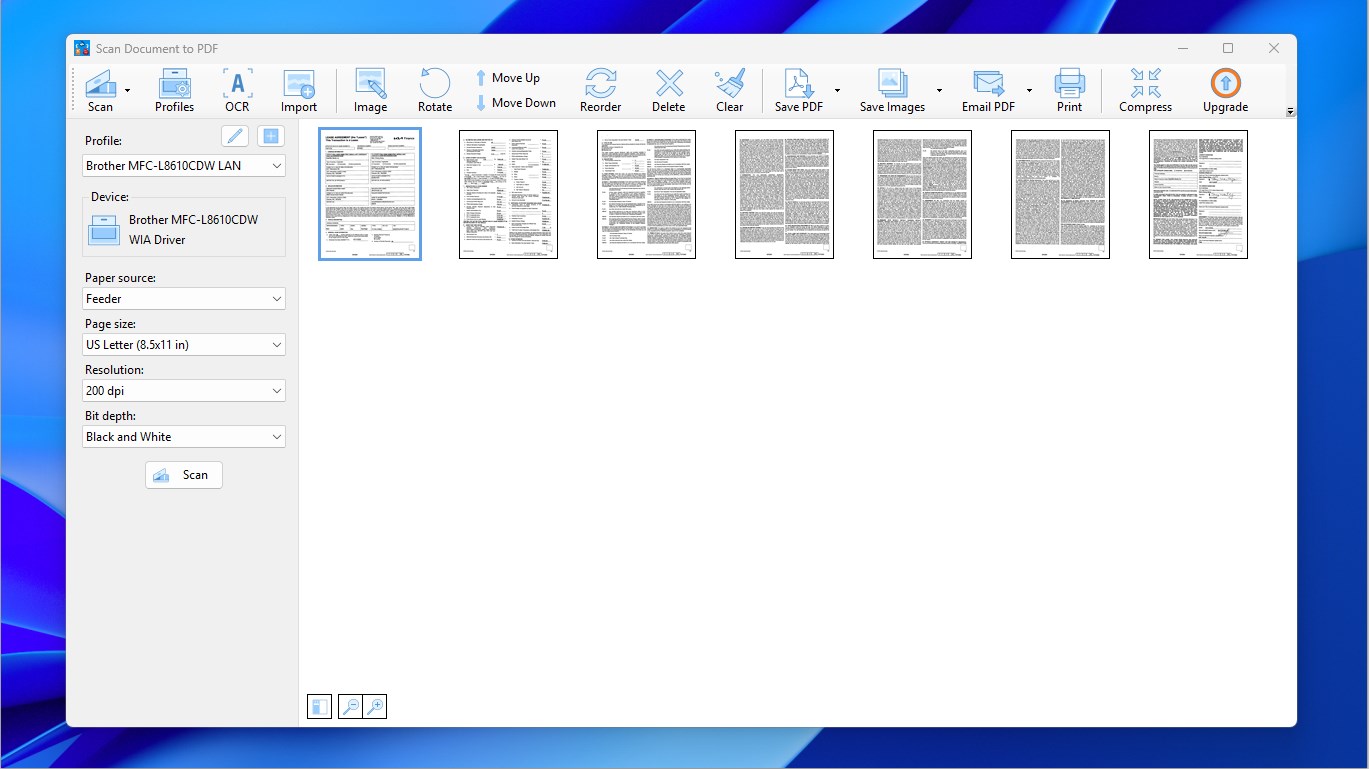
Scan Document to PDF is a document scanner that converts scanned pages into searchable PDF files. It supports batch scanning and OCR, and existing PDF pages can be added to a newly scanned document to build a new file. Pages can be cropped and reordered before saving as a multi-page PDF or as images. The app also allows merging multiple PDFs into one. It works with scanners and printers from brands such as Brother, Canon, Epson, HP and Samsung. The app is free, with a premium version offering a PDF compressor tool.
Show the developer's original descriptionHide the original description
Scan Document to PDF allows you to quickly and easily scan documents and convert them to professional PDFs. Moreover, you can add existing PDF pages to the newly scanned document and create a new PDF file.
Note: The core features of Scan Document to PDF are completely free for everyone. Premium is purely optional for users who wish to support our work. If the Premium prompt appears, simply click the X icon in the top-right corner to continue using the app.
Supported scanner and printer brands: Brother, Canon, Epson, HP, Deli, Lenovo, Panasonic, Ricoh, Samsung, Xerox, and etc.
With Scan Document to PDF, it takes 3 steps to scan your documents into a professional, searchable PDF. The 3 steps are:
- Scan documents and/or import PDFs
- Adjust pages, including cropping and re-ordering
- Save as a multi-page PDF file
In addition to the main features, you can use Scan Document to PDF to split and merge PDFs:
- To split a PDF, import the PDF into the app, delete the unwanted pages and save the rest as a new PDF file.
- To merge PDFs, import the PDFs into the app, adjust the pages and save them as a new PDF file.
If you enjoy the free features mentioned above and would like to support us, you are welcome to purchase the premium version, which provides a PDF compressor tool.
Main Features:
- Scan documents
- OCR available
- Import PDFs
- Crop and adjust pages
- Save to searchable PDF directly
- Save to images
- Compress PDFs (premium version only)
- Batch scan
Technical details about Scan Document to PDF
Scan Document to PDF in the rankings
Manage app
Are you on the developer team behind Scan Document to PDF?
Verify yourself and manage your listing on Most Voted Apps.
Verify Scan Document to PDF for free
Verification usually takes only a few minutes.
Similar apps to Scan Document to PDF
 PDF Document Scanner
Scan documents and create, edit multi-page PDF files
 PDF Doc Scanner - Scan & Print
Scan paper documents to searchable PDFs
 Doc Scan PDF Scanner
Scan documents and images, save as PDF or image format
 Print and Scan - Document Scanner App
Scan documents and photos, save as PDF or image files
 Scanner App: PDF Scan
Scan, edit and manage documents as PDF files
 CamScanner - PDF Scanner App
Scan documents with camera and save as PDF